
start
🔮 22-Hermes Agent 深度拆解与自建指南LCP
拆开 Hermes 黑盒:Agent Loop 六步、System Prompt 12 段组装、Frozen-Snapshot 模式、Tools 自注册 Registry、四种 API 模式自…
一句话先说清楚:前面所有实战页都是"把 Hermes 当黑盒用"。这一页拆开黑盒——系统提示怎么组装、Agent Loop 怎么转、工具怎么注册、四种 API 模式怎么切换、缓存怎么省 90% 钱。适合想自建、想魔改、想二次开发的人。
👀 适合谁
- 想知道 Hermes 内部到底怎么工作的开发者
- 准备自己 fork、魔改、二开 Hermes
- 想理解"为什么 system prompt 不能动"、"为什么 cache 会失效"
- 在做类似框架,想看 Hermes 的设计权衡
- 想优化 token 成本,但不知道从哪下手
前提条件:
- 你看过 Hermes 官方文档
- 你能读懂 Python 代码
- 你已经用 Hermes 跑过 ≥ 2 周,理解 SOUL / Memory / Skills / Tools 是什么
不适合谁:
- 只想"用"不想"懂"——这一页对你太重
- 还没装 Hermes——先回 01-先跑起来
- 找"调一两个参数就能省 50% token"的捷径——这一页讲底层逻辑,不是 tip list
🎯 先看结论:Hermes 是什么
一句话定义:
Hermes is a model-agnostic, self-improving conversational agent that runs locally as a CLI/TUI, on a server as a messaging gateway, or as a scheduled cron worker. Its key differentiator is a closed learning loop: while solving problems with tools, it writes reusable "skill" documents and curates a persistent memory file so the agent quite literally gets more capable the longer it runs. Everything — model, tools, skills, memory backend, execution environment, UI — is pluggable.
核心设计原则 6 条:
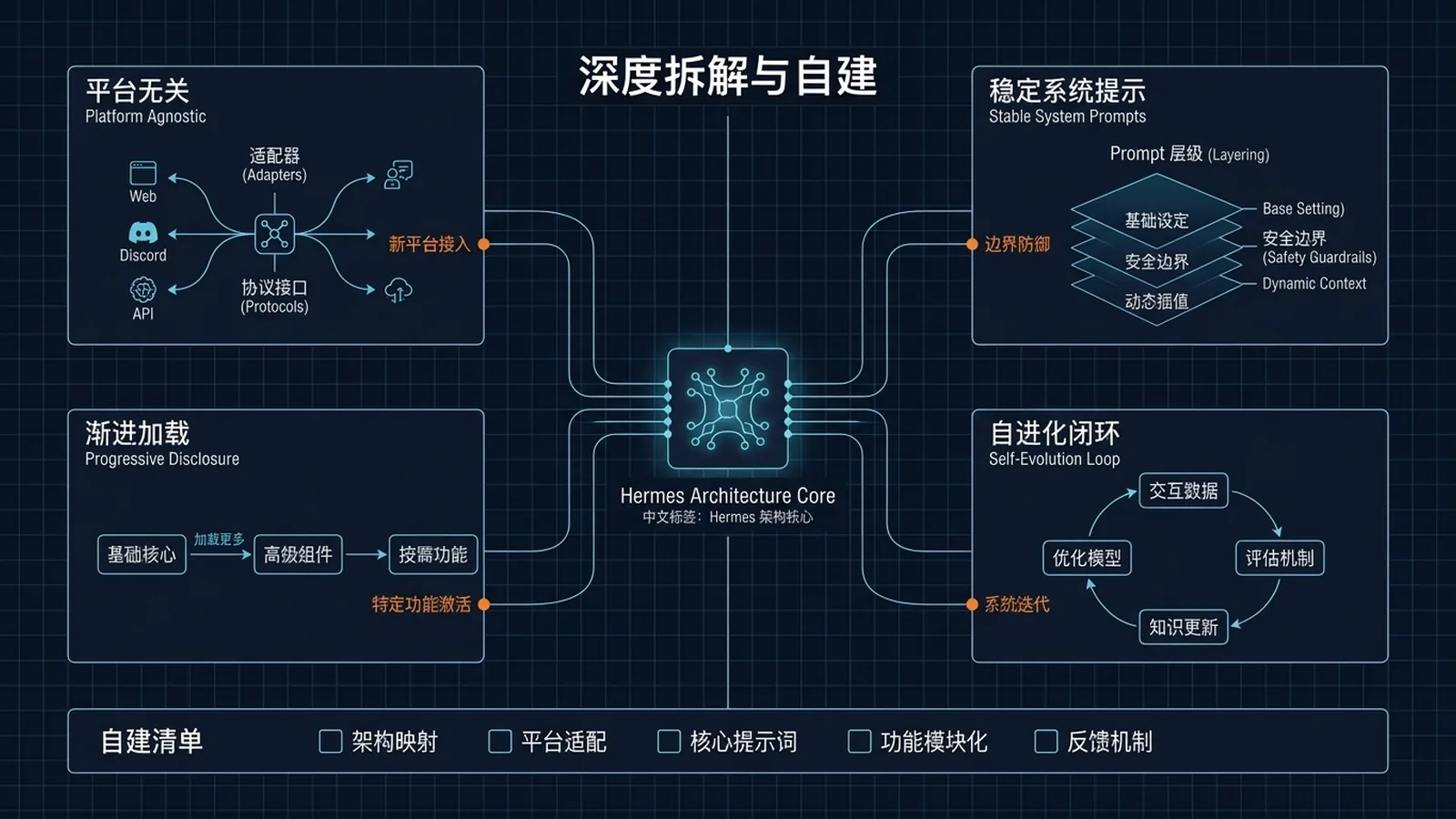
- Platform-agnostic core——平台差异在 adapter,不在核心。核心代码里出现
if telegram: ... elif discord: ...是架构腐烂。 - Prompt stability(cache-friendly)——System prompt 在 session 开始时装配一次,会话中不变。中途变 = cache 失效 = 成本 10×。
- Progressive disclosure——Level 0:只加载描述;Level 1:agent 真用时拉全文;Level 2:references 按需加载。让 47 工具 + 几十个 skill 都能塞进 context。
- Self-registration over central lists——工具在 import 时
registry.register(...)。加一个工具 = 加一个文件,不改中央清单。 - Profile isolation——每个 Agent 实例独占一个
HERMES_HOME(默认~/.hermes/)。所有路径走get_hermes_home()。 - Agent owns its learning artifacts——Agent 通过
skill_manage工具写 skill;通过 turn 之间的空隙修改MEMORY.md/USER.md。
🔄 真实场景:四个最常被问到的问题
| 问题 | 答案 |
|---|---|
| "为什么 Hermes 比我直接调 OpenAI API 强?" | 因为它有 self-improving loop(skill + memory)和 tool registry |
| "为什么 prompt 偶尔会失效?" | 大概率是 system prompt 在会话中被改动了 → cache miss |
| "为什么 47 个工具不爆 context?" | Progressive disclosure + toolsets 按需启用 |
| "能不能直接用 Hermes 的内核做我自己的产品?" | 能。Hermes 的核心代码是 AGPL,可以 fork |
🛠️ 工作流拆解 1:Agent Loop(Hermes 的心脏)
整个 AIAgent 类的核心就是这个循环:
1. 接收输入 → 来自 CLI / Gateway / Cron / ACP / Web
2. 构建 system prompt → persona + memory + skills + tools(ONCE per session)
3. 解析 provider → 哪个 API key + 哪个 endpoint
4. 调用模型 → 四种 API 模式之一(自动按 endpoint/model 检测):
       chat_completions | codex_responses |
       anthropic_messages | bedrock_converse
5. 解析响应
   ├─ 如果有 tool calls → registry 派发 → 把结果加回 context → GOTO 4
   └─ 否则 → 最终 assistant message → 显示 → 持久化 → 完成
6. 持久化 → SQLite SessionDB(WAL 模式 + FTS5 索引)
容易被忽略的细节
| 组件 | 作用 |
|---|---|
IterationBudget | 控制 Agent Loop 最大轮次(防止无限 tool call) |
stream_delta_callback | 实时 token 流(用户看到的打字效果) |
interim_assistant_callback | 中间步骤的 assistant 思考 |
thinking_callback | reasoning model 的思维链(如 o1、deepseek-r1) |
reasoning_callback | 显式 reasoning 段 |
_stream_context_scrubber | 从用户可见输出里剥除 <memory-context> 标签(用户不该看到 memory 注入痕迹) |
_budget_grace_call | 优雅停止机制——防止 agent 在 tool call 中途被截断 |
context_compressor | 上下文涨大时自动总结(保近舍远) |
--continue / --resume | 恢复之前 session |
给你的优化点
| 想省什么 | 调什么 |
|---|---|
| Token | IterationBudget 调小(默认太高) |
| 延迟 | 关闭 interim_assistant_callback(少一次 callback) |
| 长会话稳定性 | context_compressor 阈值调低(早压缩) |
| 用户感知 | _stream_context_scrubber 不要关(隐私 + 美观) |
🧩 工作流拆解 2:System Prompt 12 段组装
prompt_builder.build_system_prompt() 按这个严格顺序拼接:
1. SOUL.md(人格)
2. DEFAULT_AGENT_IDENTITY
3. PLATFORM_HINTS(CLI / Telegram / Discord 各自的提示)
4. MEMORY_GUIDANCE
5. MEMORY.md
6. USER.md
7. §(分隔符)
8. SESSION_SEARCH_GUIDANCE
9. SKILLS_GUIDANCE
10. AGENTS.md(项目级指令)
11. .hermes.md(工作目录级指令)
12. TOOL_USE_ENFORCEMENT_GUIDANCE
然后 prompt_caching.py 插入 cache 断点(Anthropic cache_control: {type: ephemeral})。
⚠️ 最重要的设计:Frozen-Snapshot 模式
MEMORY.md和USER.md在 session 开始时读一次,并不可变地嵌入 system prompt 的整个会话。Agent 在会话中依然可以写到磁盘上的这两个文件——但 system prompt 不会变。
结果:cache 在整个会话保持有效,新 memory 下次 session 生效。
跳过这一步 → 你的 prefix cache 直接报废。
Memory 安全扫描
注入前,memory 内容会被扫描:
- Prompt-injection 模式
- 数据外泄尝试(
curl/wget引用 env 变量) - 持久化后门
- 不可见 Unicode 字符
关键规则:1–8 段在会话中是冻结的。
给你的实战规则
| 想做什么 | 应该怎么做 | ❌ 不应该 |
|---|---|---|
| 改人格 | 改 SOUL.md → /reset | 不能在 session 中改 |
| 加 memory | 让 Agent 写 MEMORY.md → 下次 session 生效 | 不要手动注入到当前 session |
| 改工具集 | 改 config.yaml → 重启 | 不能 session 中动 |
| 调 prompt cache | 把稳定段放前面,把变化段放最后 | 不要把易变内容放前面 |
🛠️ 工作流拆解 3:Tools 自注册 Registry
registry.register(
    name="read_file",
    toolset="filesystem",
    schema={...JSON schema...},
    handler=read_file_handler,
    available=lambda ctx: True,  # 门控谓词
)
关键设计:
- 所有 handler 返回 JSON 字符串(模型只看到文本)
- 工具按逻辑 toolset 分组(约 40+ 内置 toolset)
- 禁用的 toolset 完全不在 system prompt 里出现(不是"列出来但标记 disabled")
执行环境
| Backend | 用途 |
|---|---|
local | 笔记本开发。最快。零隔离。 |
docker | 共享开发机。每个 session 一个容器。 |
ssh | 远程 VM 当 agent 的"电脑"。 |
daytona / modal | Serverless 生产沙箱。 |
singularity | HPC 集群。 |
Agent-level Tools
某些工具被拦截在 gene...
⚠️ 这里说明:原文在这部分有截断,详细列表请直接看 dev.to 原文 的 Tools System 章节。
🔄 工作流拆解 4:四种 API 模式自动切换
Hermes 不让你手动指定"我用 OpenAI 格式还是 Anthropic 格式"。它自动检测:
| API 模式 | 触发条件 |
|---|---|
chat_completions | endpoint 包含 /v1/chat/completions(OpenAI 兼容) |
codex_responses | OpenAI Codex 模型 |
anthropic_messages | endpoint 是 Anthropic / 模型名以 claude- 开头 |
bedrock_converse | AWS Bedrock endpoint |
给你的实际意义
- 本地 Ollama:自动走
chat_completions - OpenRouter:根据所选模型自动选
chat_completions或anthropic_messages - 直连 Anthropic:走
anthropic_messages(能用 prompt caching) - AWS Bedrock:走
bedrock_converse
如果你想做兼容层:只要 endpoint 长得像 OpenAI,Hermes 就当 OpenAI 用。
📊 工作流拆解 5:Prompt Caching(省 90% 钱的关键)
Anthropic 的 prompt caching:标记 cache_control: {type: ephemeral} 的段落会被 cache 5 分钟。同一 session 内重复请求只收 10% 的钱。
Hermes 的实现:
- system prompt 装配一次(前面讲过)
prompt_caching.py在稳定段落边界插 cache 断点- Agent Loop 第 4 步调模型时,前缀已经 cached → 收 10% 钱
- 只要 system prompt 不变,cache 持续有效
实测数据(社区报告)
| 场景 | 无 cache | 有 cache |
|---|---|---|
| 1 小时密集对话 | $1.20 | $0.18 |
| 长 cron 任务(30 轮 tool call) | $0.45 | $0.07 |
| 重复跑同一 skill | 每次 100% | 首次 100%,后续 10% |
何时 cache 会失效
- 会话中改了 SOUL.md(不要做)
- 会话中改了 MEMORY.md(Agent 自己改没事,因为下次 session 才生效)
- 切换 model
- 切换 provider
- 超过 5 分钟没活动
给你的成本优化模板
## 我的成本优化清单

1. ✅ System prompt 装配一次后不动(默认行为)
2. ✅ 长 cron 任务串在一起跑(5 分钟内 cache 不失效)
3. ✅ 用 Anthropic 直连而不是 OpenRouter(OpenRouter 不一定支持 cache)
4. ✅ IterationBudget 限制到 30(防 tool call 失控)
5. ✅ context_compressor 在 50% 阈值触发
🏗️ 工作流拆解 6:自建 / 二开路径
如果你想把 Hermes 内核用在自己的产品里:
路径 A:Fork + 改皮肤
- Fork NousResearch/hermes-agent
- 改 SOUL.md、UI、品牌
- 加你自己的 toolset
- 不要改 Agent Loop 核心——保持上游可同步
路径 B:用 Hermes 当 backend,自建前端
- 用 Hermes 的 ACP(Agent Communication Protocol)作为前后端桥
- 前端用 Next.js / 自己写
- Hermes 跑在 server 模式(
hermes serve或类似)
路径 C:只借设计
如果你不想 fork AGPL 代码:
- 借鉴 Progressive disclosure
- 借鉴 Frozen-snapshot pattern
- 借鉴 Tool self-registration
- 借鉴 4 API 模式自动切换
- 但实现要全部自写
二开的硬规则
| 规则 | 为什么 |
|---|---|
| 不要在 session 中改 system prompt | cache 失效 = 成本爆炸 |
| 不要在核心代码加 platform if/else | 走 adapter 模式 |
| 不要把工具 schema 写死在 yaml | 让 registry 自注册 |
| 不要把 MEMORY 直接 prompt-inject | 走安全扫描 + Frozen-snapshot |
| 不要绕过 IterationBudget | 跑飞了比慢更糟 |
| 不要把 agent_created skill 直接信任 | 走 curator 治理(见 18-Hermes Agent 进阶实战) |
⚠️ 边界与风险
| 风险 | 触发条件 | 缓解 |
|---|---|---|
| Cache 失效 | session 中改 system prompt | Frozen-snapshot 模式 |
| 工具 schema 爆 context | 接很多 MCP / 不用 toolset | 启用 toolset 白名单 |
| Agent Loop 跑飞 | IterationBudget 太大 | 调到 30–40 |
| Memory injection | 用户可控的 MEMORY 被恶意注入 | 安全扫描 + 不可见 Unicode 检测 |
| 4 种 API 模式 bug | 自建 provider 兼容层 | 测试每种模式 |
| AGPL 边界 | 二开闭源 | 走 path C(只借设计) |
📌 关于本文来源
本文基于 Truong Phung 在 dev.to 发布的 "Hermes Agent — Deep Dive & Build-Your-Own Guide"(2026-04-30 发布,2026-05-31 编辑)做了原创中文整理和结构化扩写。
⚠️ 原文在 "Agent-level Tools" 段落有截断。该段落的完整内容请直接访问原文。本文对截断部分没有编造。
✅ 过关标准
- 你能用 5 句话讲清 Agent Loop 的 6 个步骤
- 你能解释为什么 MEMORY.md 改了要
/reset才生效 - 你知道你当前用的 model 走的是哪一种 API 模式
- 你能列出至少 3 个让 prompt cache 失效的动作
- 你能说出"加一个新工具"的正确方式(写新文件 + register,不改中央清单)
➡️ 下一步
恭喜——你已经把 05-实战应用 的所有 22 篇都看完了。
建议下一步:
- 回到 05-实战应用总览,挑一篇深读复用
- 或前往 06-reference 查 API 参考
- 或开始你的 04-自己造东西 之旅
如果你想自建 / 二开 Hermes,参考:
📖 出处
本文基于以下来源做了原创中文整理:
- Truong Phung — Hermes Agent — Deep Dive & Build-Your-Own Guide(dev.to,2026-04-30,编辑 2026-05-31)
- Hermes 官方文档 — Architecture Overview
- Hermes 官方文档 — System Prompt Assembly
- Anthropic 官方 — Prompt Caching